Web Dashboard · Mamo · 2026
AI Insights
Mamo's first AI feature: a chat interface inside the merchant dashboard where merchants ask financial questions and get AI-powered answers. Revenue month-to-date, payment decline analysis, comparisons, predictive insights. It started with a 3-hour design sprint I joined alongside Joharah (Head of Design) and the product squad, contributing directions and ideas. Joharah led the sprint and owns the primary UI that came from it; I owned everything that made it shippable: the Blaze component architecture, making every flow responsive, every interaction state, and the full annotation pass.
The challenge
A full AI chat interface is a different design scope than a standard product screen. Voice input, multiple response formats, responsive behavior across every flow, component architecture that survives the next AI feature. Most of it had to be built from scratch.
The sprint and the design review produced the UI. The system layer had to be built on top of it. Both halves were essential. Neither would ship alone.
How I approached it
Scoping the system layer myself
After the initial internal review, once the UI and UX were close to ready, I started leaving comments on the file as todos for myself: what the design-system layer would need, the component architecture, the build plan, what would make it extensible for Mamo's AI roadmap.
I wrote the game plan up as a proposal, not a response to a task. It was approved without changes. Nobody had to hand me the gaps. They were visible.
Component suite
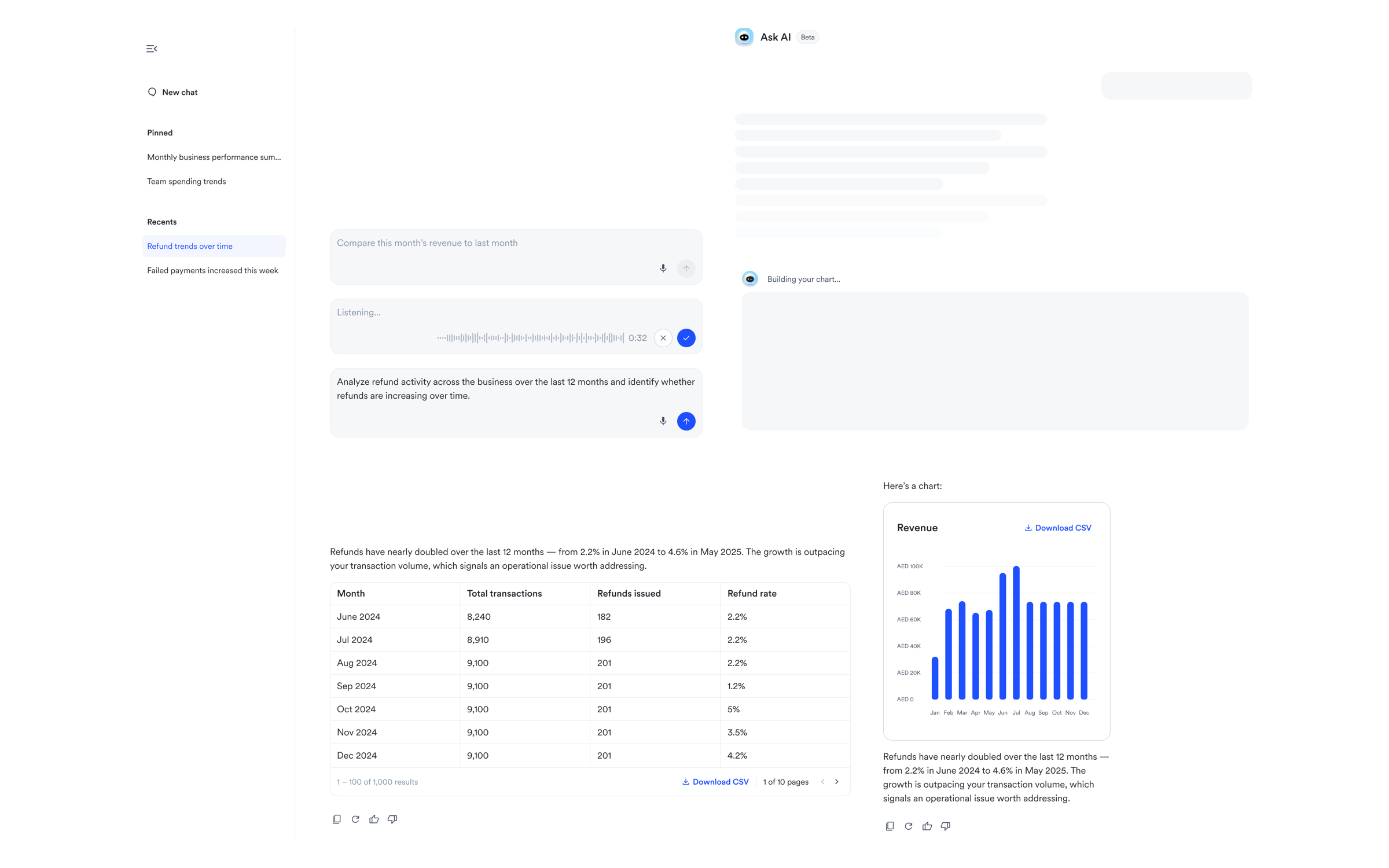
Built the full AI component suite as a dedicated Blaze section. 11 components from scratch: prompt input, voice recording with a real-time audio waveform, chat sidebar, top bar, user bubble, text response, chart response, table response, response actions, thinking state, system messages.
Two separate prompt inputs were merged into one. No reason for them to be different, and other AI platforms don't split them either. Every icon replaced with proper Blaze library instances. The alternative was one-off local components that wouldn't survive the next AI feature.
Interaction states
None of this existed before.
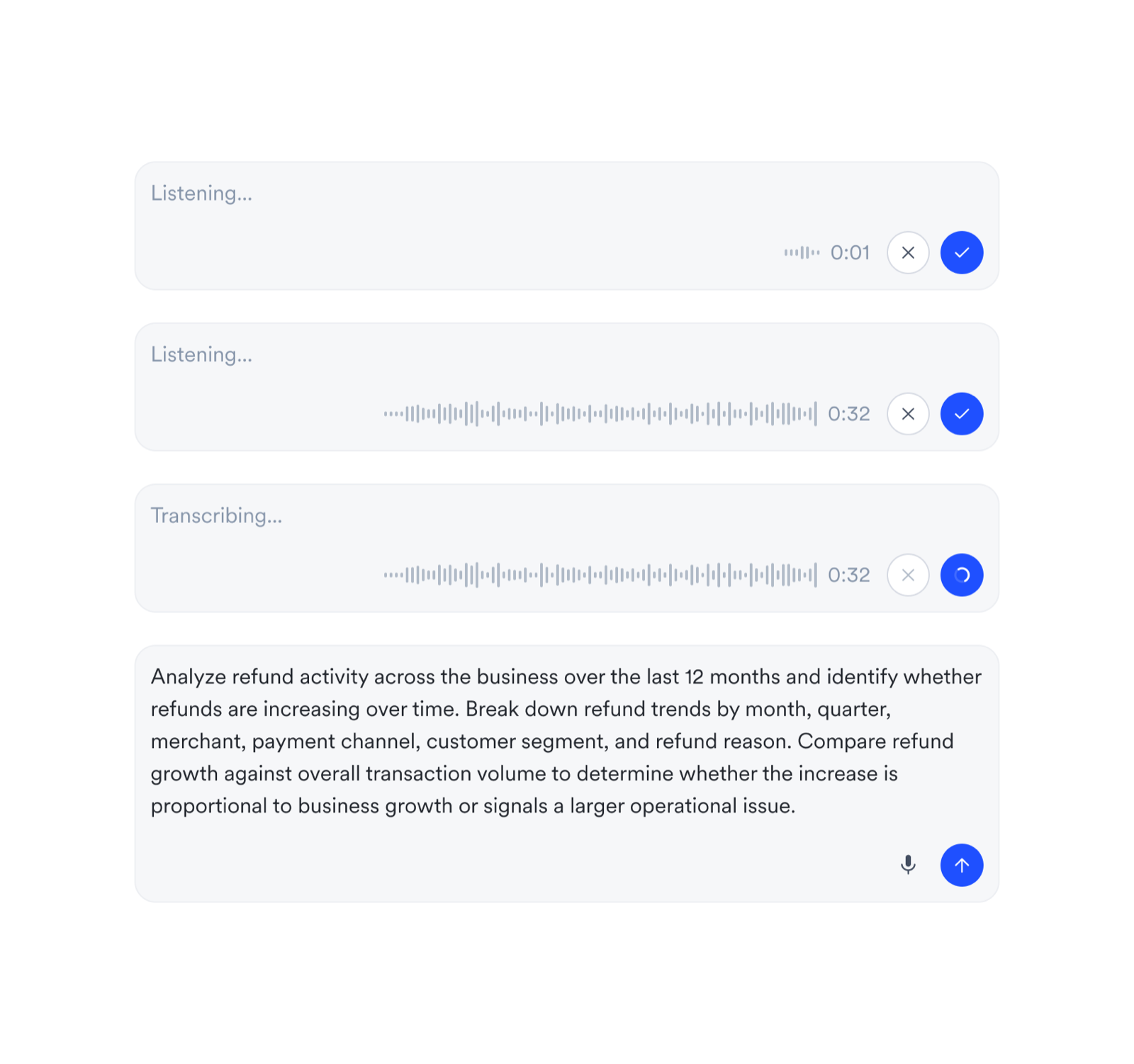
- Speech-to-text: designed the full state set — listening, transcribing, two-stage feedback, confirm/cancel controls.
- Chat response actions: copy, retry, like, dislike, regenerate — every flow end-to-end with snackbar feedback and cycle navigation for retry versions.
- Sidebar actions: pin, rename, delete — with modals, snackbar, and redirect behavior.
- Chat loading: thinking state with contextual copy tied to query type.
- Table and chart loading: each with distinct thinking states.
- Responsive: the base designs had mobile, but not every flow was accounted for. I made sure all of them worked at mobile sizes, including the table treatment, horizontal scroll, stacked footer, download placement.
Every one of these would have shipped as a gap without the dedicated pass.
Annotation pass
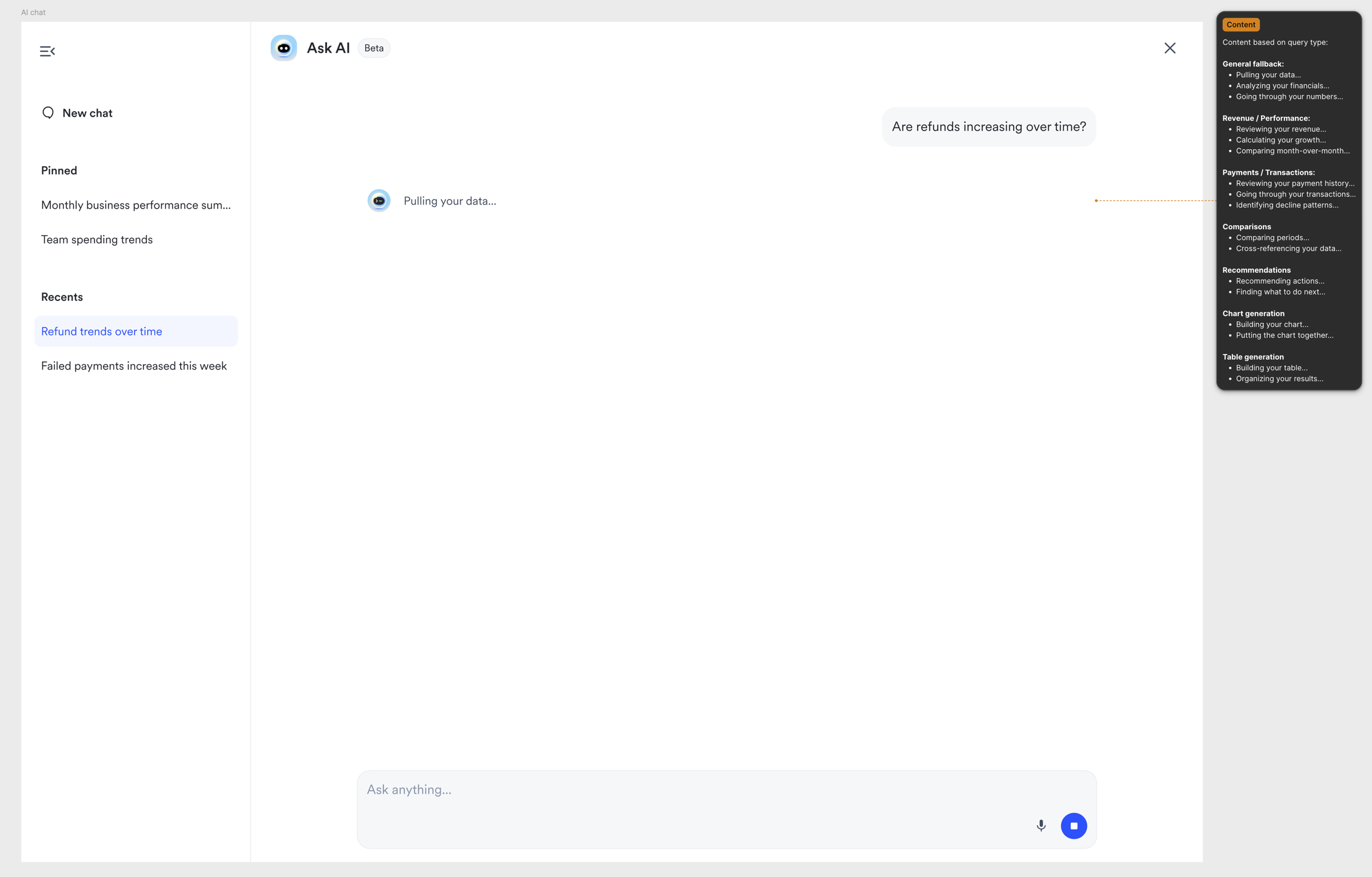
Zero annotations before this pass. Every scenario annotated: input size at single line vs multi-line, table generation vs chart generation, thinking state copy, interaction behavior on each action, mobile specifics, edge cases.
Gave developers a reference for thinking-state copy tied to query type. Annotations are invisible to users, but they're the difference between a developer guessing and a developer shipping.
What emerged
Two ideas that came from my side.
- The placeholder animation: cycling prompt suggestions in the input, approved unanimously by the team.
- The glassmorphism scroll gradient: a blur/fade at the bottom of the scroll area above the input, validated when the design lead arrived at the same idea independently in the same session.
Motion
The motion layer ran in parallel with the component work. Deep research into how AI interfaces handle micro-interactions: easing, transitions, timing. Emil Kowalski's principles were active references while building, not background reading. The animation vault content fed directly into this work.
What came of it
Production-ready spec for Mamo's first AI feature. 11 AI components built as an extensible Blaze section so every future AI feature has building blocks ready. Every flow made responsive. Every interaction state designed and annotated.
The beta launched as a pilot to learn what merchants actually ask for, with a feedback loop to track every unavailable request. The feature went from a direction to something engineering can build without guessing.
Reflection
What I would do differently
The component architecture is extensible, but the feedback loop should have been built into the component design from day one, not added after. Up and down votes, tracking unavailable requests, response time monitoring. All of it affects how the chat bubble, response actions, and sidebar connect.
We designed the analytics layer after the component pass and had to retrofit. The next AI feature gets instrumentation designed in parallel with the UI.